
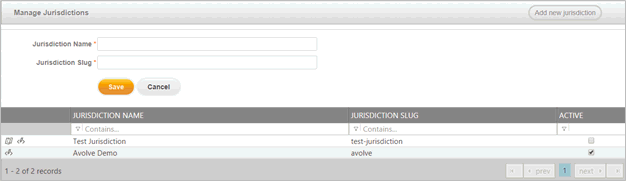
The Manage Jurisdiction page allows an overall admin to view all the jurisdictions hosted on the web server. The selection of the menu items above will be specific to that jurisdiction.
Add
a new jurisdiction by clicking  and filling
out the necessary information:
and filling
out the necessary information:
Jurisdiction Name (required): Name of jurisdiction OAS installs. It will be used as the title for the OAS install in the user interface, emails, etc.
Jurisdiction Slug (required): A slug is a human-readable version of a primary key, a unique identifier, in this case, for the jurisdiction.
Once the Save button is clicked, you will be taken to the Jurisdiction Configuration page to complete the information.
Content is editable by clicking the edit icon or the change icon
  . These options will only
be available for an Overall Admin. If OAS is hosted by the customer, they
will have one jurisdiction. OAS is also a multitenant application and
the slugs are the differentiators for multitenant implementation.
. These options will only
be available for an Overall Admin. If OAS is hosted by the customer, they
will have one jurisdiction. OAS is also a multitenant application and
the slugs are the differentiators for multitenant implementation.
