The Project Export screen allows Limited Administrators to only export projects from the Basic tab.
Project exports are performed using export templates. The result of the export to the file system allows the files and associated data to be imported into a document management system. Avolve Professional Services can customize the output for your particular document management system.
To export project contents (groups, users, permissions, roles, metadata, files, incoming emails, and markups), a user must access the Export tab of the specific project they wish to export. Two tabs are available for exporting:
Basic tab
The Basic tab is enabled when at least one export template has been created. This tab is a shortcut, allowing the administrator to select the desired folder(s) for export and then apply a previously defined template to the export.
To use the Basic tab:
From the Select Template dropdown, select the template to apply.
From the Select Export Folders section, select the check boxes for the folder(s) to Export. This view shows all the folders of the current project.
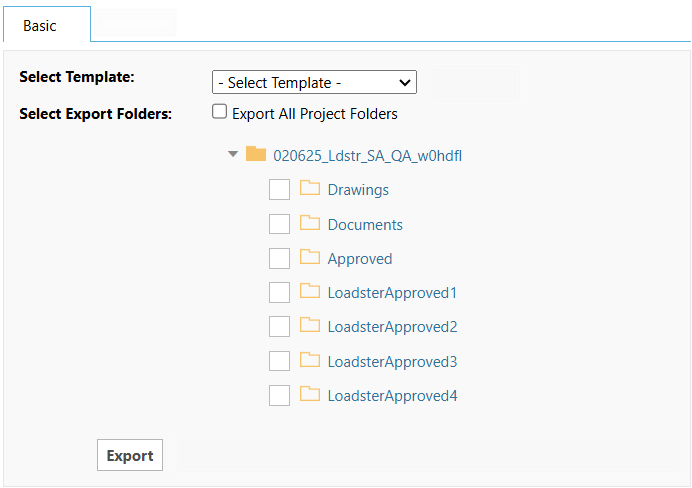
Click the Export button.
A message will display, indicating an email will be sent to the user to notify them when the export has been completed. Click OK to complete the export.
Settings from the Approved Export template are applied to the selected folder(s).
 eForms and workflows are not included in a project
export.
eForms and workflows are not included in a project
export.